
An ABS warning light, a speedometer that flickers to zero, cruise control that refuses to engage and an automatic gearbox stuck in one gear can all come from the same small part: a wheel or vehicle speed sensor. Because one speed value is shared by many control units, a single bad sensor often produces codes in several modules at once. This guide walks through how speed sensors are built, how to tell a sensor fault from a ring, wiring or tyre problem, and what codes to expect, with notes for cars, trucks, tractors and motorcycles.
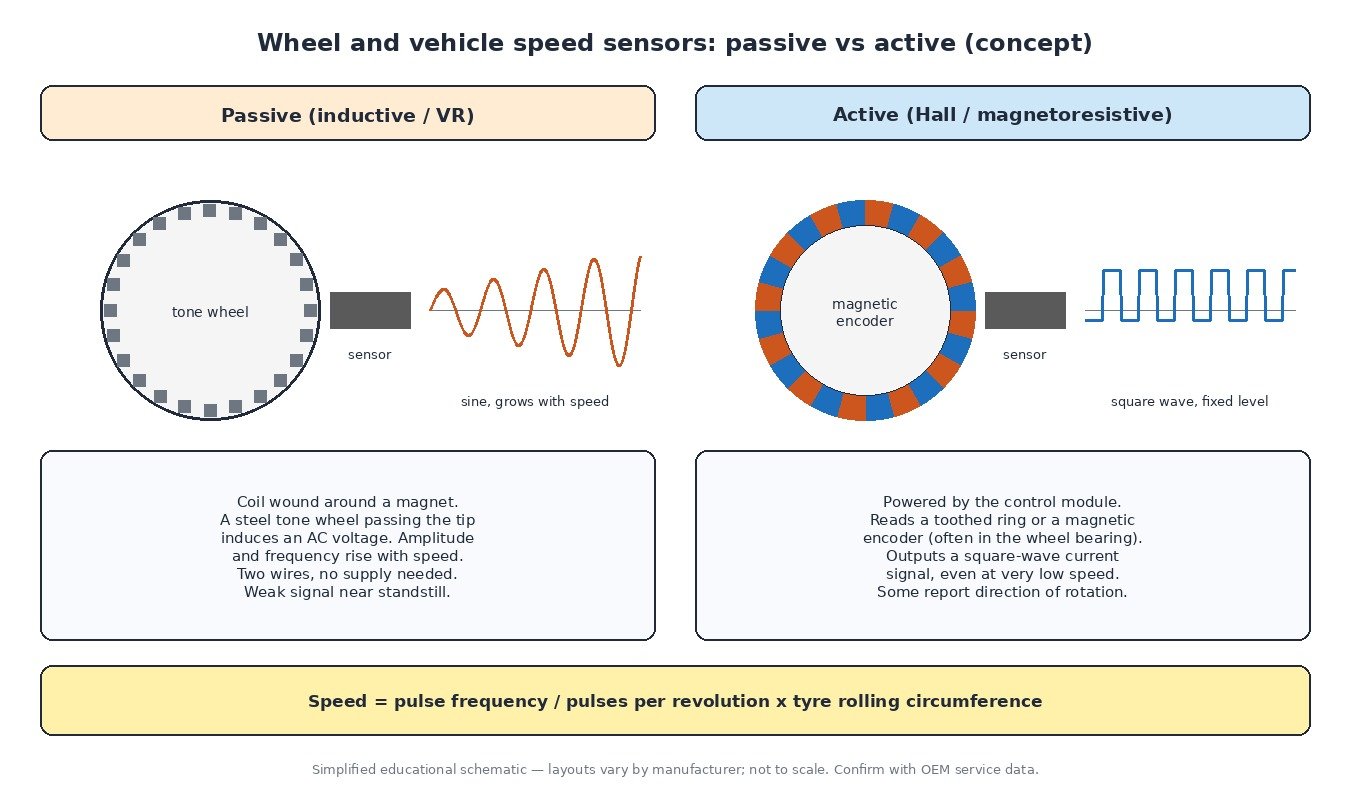
Speed sensors in brief
Every speed sensor works by counting. A toothed ring, a magnetic encoder in the wheel bearing or a target wheel in the gearbox rotates past the sensor tip, and the control module counts the pulses. Pulses per second, divided by the number of teeth or poles and multiplied by the tyre’s rolling circumference, gives road speed. A wrong tyre size, a damaged ring or a missing tooth therefore affects the speed reading just as much as a failed sensor.
Passive or active: know which one you have
The test method depends on the sensor type, so identify it first.
- Passive (inductive) sensors contain a magnet and a coil. They generate their own AC voltage, which grows with speed. They are typically two-wire, and you can measure coil resistance with the connector unplugged. Near standstill their signal is too weak to use.
- Active sensors (Hall or magnetoresistive) are powered by the ABS module and produce a square-wave signal, often as a switching current. Measuring resistance across them tells you little; check supply at the connector and look at the signal with the module’s live data or a scope. They read speed down to almost zero.
Gearbox input and output speed sensors may be either type, depending on the design.
Why several modules complain at once
On most modern vehicles the wheel sensors are wired to the ABS/ESP module, which calculates wheel speeds and a vehicle reference speed and sends them over CAN. The engine ECU uses that value for cruise control, the speed limiter and gear detection; the TCU uses it, together with its own gearbox sensors, for shift points and lock-up; the instrument cluster shows it on the speedometer.
So when a front wheel sensor fails, the ABS module stores the real fault, the engine ECU may log a vehicle speed code, the TCU may log a plausibility code and some modules may report invalid data received from the ABS module. Always start from the module that holds the root cause.

Step-by-step diagnostic routine
- Full scan. Read codes and freeze frame data from all modules. Note which wheel or sensor the ABS module names.
- Compare wheel speeds. In live data, drive slowly and straight. All wheels should read almost the same. A wheel that drops to zero, lags or jumps is the suspect.
- Check intermittents. Many faults appear only over bumps or when steering. Watch live data while flexing the harness near the strut or axle with the vehicle safely supported.
- Electrical tests. Passive sensor: resistance and AC output while spinning the wheel. Active sensor: supply and ground at the plug, then the signal. Look for green corrosion and water in connectors.
- Mechanical inspection. Remove the sensor and inspect the tip for metal debris or cracks. Check the tone ring for rust, cracks and missing teeth, and the bearing encoder for damage or reversed fitting.
- Plausibility. Confirm matching tyre sizes and tread depth, and that any coded tyre size or axle ratio is correct.
Common real-world causes
- Rust jacking on cast tone rings, which cracks the ring or pushes it out of shape.
- Metal swarf stuck to magnetic sensors and encoders, often after brake or bearing work.
- A replacement hub bearing fitted with the magnetic encoder facing away from the sensor.
- Chafed wiring where the harness flexes with suspension travel.
- A mismatched spare wheel or a new pair of tyres on one axle causing speed mismatch warnings.
Notes by vehicle type
Cars and vans: four wheel sensors plus input and output sensors on many automatic and dual-clutch gearboxes. A failed output sensor commonly leads to harsh shifts or a fixed limp-home gear. Trucks: wheel sensors serve the braking system, while road speed for the engine, the legal speed limiter and the tachograph usually comes from the gearbox output sensor. Tractors and agricultural machines: wheel slip makes wheel speed misleading, so many use a radar ground-speed sensor for work rate and implement control; a ground-speed fault can upset seeding or spraying rates. Motorcycles: ABS bikes have front and rear sensors, and traction control compares the two; the rear sensor often also drives the speedometer.

Speed signals and the ECU file
Speed information is used throughout the engine and gearbox software, for cruise control, per-gear torque limits and shift strategy. After an ECU or TCU has been replaced or reprogrammed, having the correct original file for the exact hardware and software number gives a known reference when speed-related faults appear. Fix the sensor, ring or wiring first, and keep legally required speed limitation as the manufacturer intended.
Related fault codes (DTCs)
Generic OBD-II codes (SAE J2012). Individual wheel speed sensor faults are normally stored in the ABS module under manufacturer-specific codes, so check the OEM description for the vehicle.
| Code | Meaning | Typical causes |
|---|---|---|
| P0500 | Vehicle Speed Sensor “A” | No or implausible speed signal: failed sensor, wiring or connector fault, missing speed message from the ABS module |
| P0501 | Vehicle Speed Sensor “A” Range/Performance | Speed does not match engine speed and gear, wrong tyre size, damaged tone ring, intermittent wiring |
| P0502 | Vehicle Speed Sensor “A” Circuit Low Input | Open or shorted signal circuit, sensor failure, poor ground |
| P0503 | Vehicle Speed Sensor “A” Intermittent/Erratic/High | Loose connector, chafed wiring, electrical interference, metal debris on the sensor tip |
| P0574 | Cruise Control System – Vehicle Speed Too High | Vehicle speed above the cruise control limit, or an incorrect speed signal |
| P0715 | Input/Turbine Speed Sensor “A” Circuit | Gearbox input speed sensor or wiring fault, connector corrosion, low transmission fluid on some designs |
| P0716 | Input/Turbine Speed Sensor “A” Circuit Range/Performance | Erratic sensor signal, internal gearbox slip, wiring interference |
| P0717 | Input/Turbine Speed Sensor “A” Circuit No Signal | Open circuit, failed sensor, damaged reluctor or target |
| P0720 | Output Speed Sensor Circuit | Gearbox output speed sensor or wiring fault, connector damage |
| P0721 | Output Speed Sensor Circuit Range/Performance | Signal does not match wheel speeds, debris on the sensor, damaged target wheel |
| P0722 | Output Speed Sensor Circuit No Signal | Open circuit, failed sensor, unplugged connector |
| P0723 | Output Speed Sensor Circuit Intermittent | Loose terminal, chafed wiring, vibration-related break |
| U0121 | Lost Communication With Anti-Lock Brake System (ABS) Control Module | ABS module power or ground fault, CAN wiring fault, failed module |
| U0415 | Invalid Data Received From Anti-Lock Brake System (ABS) Control Module | ABS module reporting an invalid speed value, often after a wheel speed sensor fault stored in the ABS module |
Closing
Speed sensor faults are rarely hard once you read every module and compare all the speeds side by side. Find the wheel that disagrees, then work through sensor, ring, wiring and tyres in that order.
Need the original stock file for a specific ECU hardware and software number? Browse the ECUFlashFiles original file catalogue.