
Open an ECU read in a calibration editor for the first time and you see thousands of hex values with no labels. Somewhere inside are the maps that control fuel, boost, torque and timing. This guide explains how editors such as WinOLS make sense of that data, which map families matter, why the original file is the most valuable thing you own, and which fault codes appear when files are mismatched or written incorrectly.

Where the editor fits in the toolchain
Every ECU job involves two kinds of software. The flashing tool, for example KESS, K-TAG, Autotuner or Flex, handles communication: it reads the ECU over OBD, on the bench or in boot mode, and later writes a file back. The calibration editor handles the content. It shows the file as hex, as text, as a 2D graph where maps appear as repeating shapes, and as a 3D surface once a map is defined. It also lets you compare two files byte by byte, which is one of its most useful functions in day-to-day work.
The file itself is divided into areas: the bootloader, the application software (program code), and the calibration data the code reads at runtime. Practically all tuning and repair work happens in the calibration area.
How a map is defined
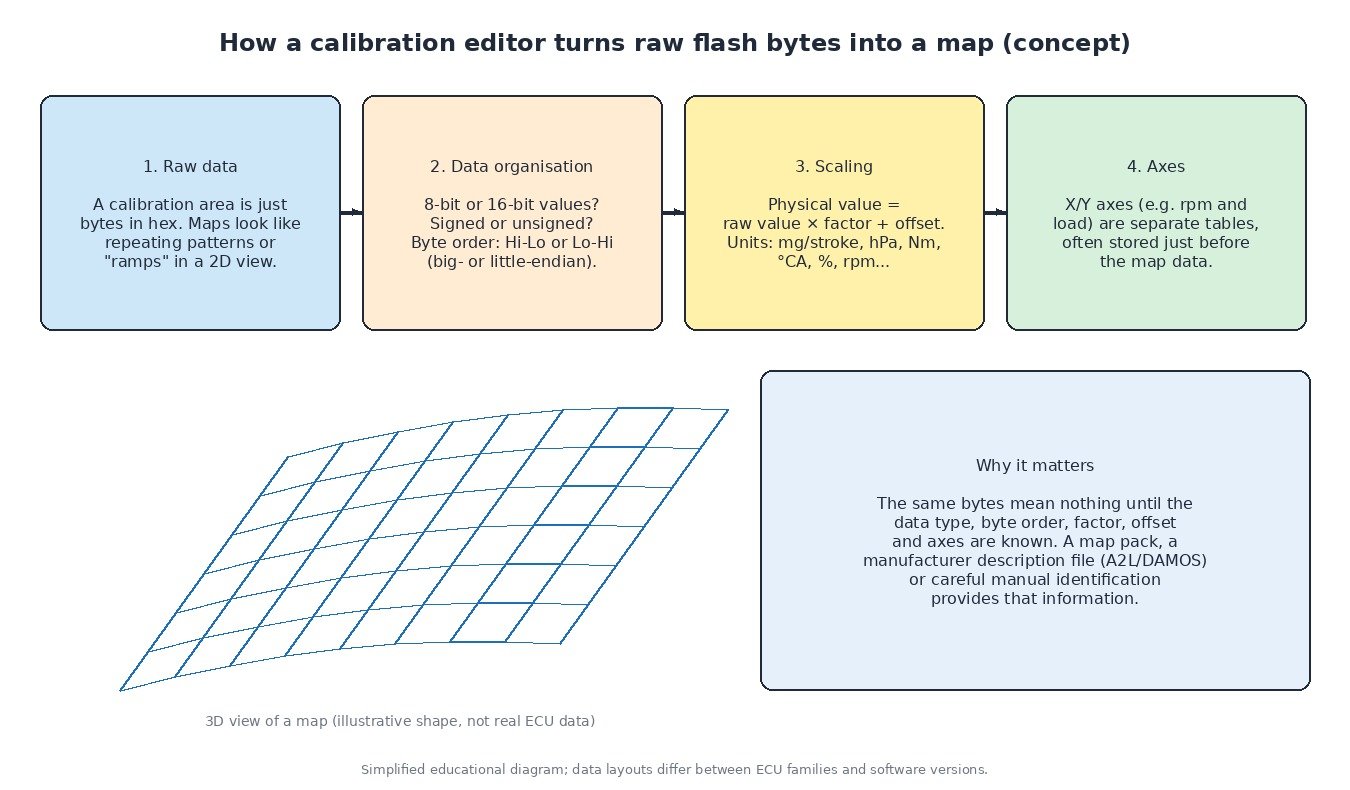
A map becomes readable only when the editor knows how it is stored:
- Word size and sign: 8-bit, 16-bit or larger values, signed or unsigned.
- Byte order: high byte first or low byte first, depending on the processor family.
- Factor and offset: the physical value is the raw value times a factor plus an offset, giving units such as mg per stroke, hPa, Nm, degrees crank angle or percent.
- Axes: the X and Y breakpoints, such as rpm against load, stored as small separate tables and often placed right before the map.
- Dimensions: the start address and the number of columns and rows.
Definitions come from a manufacturer description file (A2L or DAMOS) where legitimately available, from a map pack prepared for that exact software version, or from careful manual identification. Getting the byte order or factor wrong gives numbers that look reasonable but describe something else entirely, so every definition should be checked against physics: does the rpm axis run in a sensible range, does the boost map rise with load, does the fuel map look smooth?
The map families you will meet
Whatever the ECU supplier, engine calibrations share the same functional groups: driver’s-wish maps that turn pedal position into a torque request; torque limiters and protection limits; diesel smoke limits based on air mass; rail pressure and injection timing maps; injector quantity-to-duration conversion; boost targets, limits and actuator control; and on petrol engines, spark advance and knock corrections. Gearbox controllers add shift maps, torque limits and clutch pressure data. Truck and tractor calibrations often contain several power ratings and governor or PTO functions, and motorcycle files commonly include per-gear and ride-mode tables.

Why the original file matters most
The unmodified read is the reference for everything else. Without it you cannot compare, cannot see what a previous tuner changed, and cannot restore the vehicle if a write fails. Good practice is simple:
- Save the original read with the vehicle details, the ECU label photos and the tool log, and never overwrite it.
- Where the read method allows, keep the EEPROM as well as the flash, because immobiliser and adaptation data often live there.
- Record the hardware and software numbers read from the ECU, not only those printed on the label.
- Treat every modified version as a new file with its own name.
If the original is lost or was already modified, a verified stock file for the same hardware and software number is the way back to factory behaviour.
Comparing files and checking consistency
The compare function shows exactly which bytes differ between two files. Use it before every write: changes should appear only in the maps you intended to touch. Unexpected differences can mean a different software version, a corrupted read or an accidental edit. Modern torque-based ECUs also check that their own calculations agree, so inconsistent changes between torque, quantity and limit maps can trigger torque-monitoring faults even when the engine seems to run.
Checksums and writing
Most ECUs store checksums over their memory areas and verify them at start-up. If the data changes and the checksum does not, the ECU may refuse to start or set a memory checksum code. Checksums are corrected either by the editor or by the flashing tool when it writes, depending on the protocol. Write with a stable supply voltage, verify the write, and then clear codes and datalog.
Related fault codes (DTCs)
Generic OBD-II codes (SAE J2012) often seen after interrupted programming, wrong software or inconsistent calibration data. Confirm with live data and the manufacturer’s procedure; heavy-duty vehicles may show equivalent J1939 SPN/FMI codes.
| Code | Meaning | Typical causes |
|---|---|---|
| P0601 | Internal Control Module Memory Check Sum Error | Modified file written without a correct checksum, corrupted flash after an interrupted write, internal ECU fault |
| P0602 | Control Module Programming Error | Incomplete or failed programming session, software not matching the hardware, unprogrammed replacement ECU |
| P0603 | Internal Control Module Keep Alive Memory (KAM) Error | Loss of permanent battery supply, battery disconnected during learning, internal memory fault |
| P0604 | Internal Control Module Random Access Memory (RAM) Error | Internal ECU hardware fault, sometimes after supply voltage problems |
| P0605 | Internal Control Module Read Only Memory (ROM) Error | Corrupted or incompatible software, failed flash write, internal memory fault |
| P0606 | Control Module Processor | Internal processor or monitoring-module fault, supply or ground problems, damaged ECU |
| P062F | Internal Control Module EEPROM Error | EEPROM data corrupted or mismatched, wrong EEPROM written back after bench work, internal fault |
| P061B | Internal Control Module Torque Calculation Performance | Torque monitoring detects implausible torque values, inconsistent edits between torque-related maps, internal fault |
| P0610 | Control Module Vehicle Options Error | Variant coding missing or not matching the vehicle, ECU from a different vehicle or variant |
| P0630 | VIN Not Programmed or Incompatible – ECM/PCM | VIN not written to a replacement ECU, VIN mismatch with other modules |
| P0560 | System Voltage | Weak battery, charging faults, poor grounds; low voltage during reading or writing is a common cause of failed programming |
| P0234 | Turbocharger/Supercharger “A” Overboost Condition | Boost target above what the control system can hold, boost control faults, sticking VGT vanes or wastegate |
| P0299 | Turbocharger/Supercharger “A” Underboost Condition | Boost leaks, actuator faults, or a target the turbocharger cannot reach |
| P0087 | Fuel Rail/System Pressure – Too Low | Restricted fuel supply, weak pump, or demand above the fuel system’s capacity |
| P0088 | Fuel Rail/System Pressure – Too High | Pressure control valve or metering valve faults, sensor errors, inconsistent rail pressure targets |
| P0219 | Engine Overspeed Condition | Engine exceeded its programmed speed limit, for example on a missed downshift or overrun |
| U0100 | Lost Communication With ECM/PCM “A” | ECU not responding on the network, power or ground loss, ECU left in programming mode, CAN wiring faults |
Closing
An editor turns raw bytes into maps only when the definitions are right, and every change is only as safe as the original you can return to. Keep the stock read, compare before writing, and check the result with a datalog.
Need the original stock file for a specific ECU hardware and software number? Browse the ECUFlashFiles catalogue.